

Embracing the digital age, we are delighted to join forces with Omniboost as our integration partner. Their flexible and comprehensive platform empowers us to effectively handle our expanding requirements while ensuring seamless data management across our hotels. With Omniboost, we have discovered a true partnership that enables us to excel in the dynamic hospitality industry.

-
Products

- Industries
- Integrations
-
Resources

-
Company

-
Contact us
- Login
-
ProductsView all products
 Accounting
 PMS
PMS POS
POS Insights
 Owners Portal
-
IndustriesView all industries
Management Companies
 Hospitality Groups & Chains
Boutiques & Smaller Groups
Hospitality Groups & Chains
Boutiques & Smaller Groups Restaurants & Cafes
 Vendors
-
IntegrationsView all integrations

-
ResourcesNews
 Podcast
 Case Studies
 Testimonials
 Glossary
 Media Kit
-
CompanyAbout Us
 Careers
 Help Center
 Integrations
Trust Center
Integrations
Trust Center Login
Login
Mews to Xero
Back to Mews

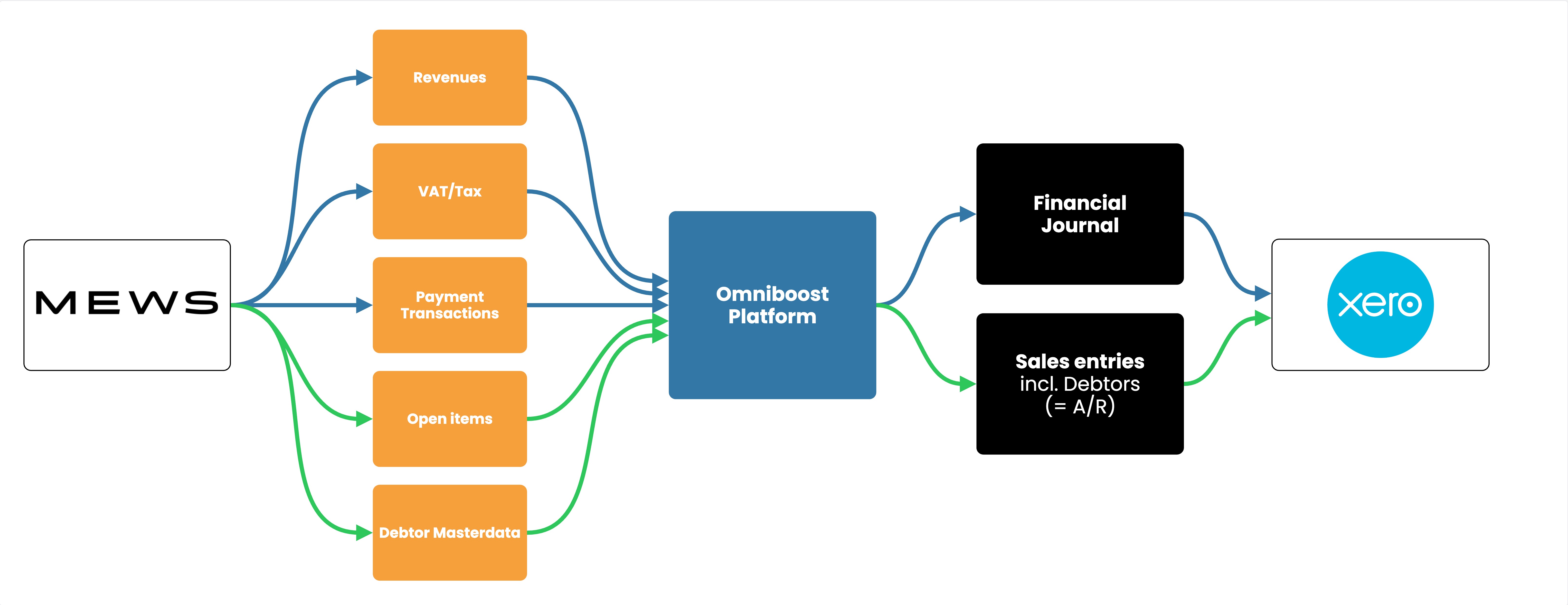
The MEWS to Xero integration by Omniboost transfers accounting data from your MEWS environment to Xero. The integration eliminates manual data entry, improves accuracy, and speeds up month-end closing for your hotel finance team.
About this integration
Source Specification:
Mews
Target Specification:
Xero
Availability:
Available in the following countries: Globally
Connectivity:
Source and target systems connect and exchange data automatically via API.
Data Frequency & Timing:
By default the integration runs daily. The timing of the integration run is flexible but always respects the end-of-day settings in your MEWS environment.
Available Accounting Flows: The difference between a Closed and Consumed accounting flow
Consumed-Accounting Flow (Accrual)
Closed-Accounting Flow (Journal Entries - Cash based)
Closed-Accounting Flow (Bills and Invoices based)
Pick the tier that matches your operation
The Mews integration is available in three tiers. Each unlocks more granular data, support, and onboarding to fit the needs of your property or group.
Bronze is included in your Mews subscription for standard automation, while Silver and Gold unlock more granular data flows, dedicated Omniboost support, and ongoing optimization for teams with more complex requirements. Learn more here.
Integration Flowchart
About the Omniboost Base Platform
Omniboost Base gives you a single platform to onboard, monitor, and manage all your Omniboost accounting integrations — across all your properties. From reviewing integration status and updating mapping to tracking data runs and resolving errors, everything you need to keep your connections running smoothly is in one place. Learn more here.
Integration features
Features | Consumed Flow | Closed Flow (Journals) | Closed Flow (Bills & Invoices) |
|---|---|---|---|
Features available for all tiers | |||
Transfer Revenues | Supported | Supported | Supported |
Transfer Payments | Supported | Supported | Supported |
Transfer VAT / Tax | Supported | Supported | Supported |
Accounts Receivables (A/R) | Supported | Supported | Supported |
Features available only in Silver and Gold tiers | |||
Detailed Revenue Entries | Supported | Supported | Supported |
Detailed Payment Entries | Supported | Supported | Supported |
Skipping Revenue Entries | Supported - Only in Bills repo | Supported - Only in Bills repo | Supported - Only in Bills repo |
Skipping Payment Entries | Supported - Only in Bills repo | Supported - Only in Bills repo | Supported - Only in Bills repo |
Credit Card Fee Split - Commission Calculation | Supported | Supported | Supported |
Matching Debtor numbers | Supported | Supported | Supported |
Features available only in Gold tier | |||
Statistics | Not Supported | Not Supported | Not Supported |
Customizing the Journal Description | Supported | Supported | Supported |
Customizing Revenue and Payment descriptions | Supported | Supported | Supported |
Market Segmentation for Accommodation Revenues | Supported | Supported | Supported |
Advanced Mapping Logic | Supported | Supported | Supported |
Payment Reconciliation Support | Supported | Supported | Supported |
Please note: Features and flowchart may vary depending on the setup of the target and source systems, the selected tier, and the accounting flow applied. Not all features in the Omniboost Base Platform are supported for all integrations.

Kari Anna Fiskvik
Vice President Technology, Strawberry
Onboarding Process
Before You Start: Before starting your onboarding, your Mews setup must be completed, following the steps described in this Mews configuration guide. The integration cannot be configured or activated until this step is finished.
- Request the integration
After completing your Mews setup, request the integration via the Mews marketplace within your Mews PMS environment. You will receive an invitation within minutes to Base, the Omniboost integration platform. - Select your tier
Select from three integration tiers based on your requirements. - Complete onboarding
Please complete the guided steps in “Base” and submit all required information promptly, as any delays directly affect the amount of historical data that can be included. Learn more about onboarding in The Omniboost Base Platform. - Review and go-live
Omniboost reviews your configuration, performs validation, and activates the integration. Data will not flow until the integration is set live by Omniboost.
Looking for this Solution?
We are happy to help you with your integration, just fill out the form and we will contact you about the possibilities.
