

Our migration to a new PMS came with a very tight timeline, so building confidence across our properties was critical. Omniboost helped us make that transition smoothly by enabling a live data connection between the legacy and new PMS, allowing teams to validate their data ahead of go-live. With every migration, the process became smoother, and the Omniboost team truly felt like an extension of our own migration team.

-
Products

- Industries
- Integrations
-
Resources

-
Company

-
Contact us
- Login
-
ProductsView all products
 Accounting
 PMS
PMS POS
POS Insights
 Owners Portal
-
IndustriesView all industries
Management Companies
 Hospitality Groups & Chains
Boutiques & Smaller Groups
Hospitality Groups & Chains
Boutiques & Smaller Groups Restaurants & Cafes
 Vendors
-
IntegrationsView all integrations

-
ResourcesNews
 Podcast
 Case Studies
 Testimonials
 Glossary
 Media Kit
-
CompanyAbout Us
 Careers
 Help Center
 Integrations
Trust Center
Integrations
Trust Center Login
Login
Mews to QuickBooks Online
Back to Mews


The MEWS to Quickbooks Online integration by Omniboost transfers accounting data from your MEWS environment to QuickBooks Online. The integration eliminates manual data entry, improves accuracy, and speeds up month-end closing for your hotel finance team.
About this integration
Source Specification:
Mews
Target Specification:
QuickBooks Online
Availability:
Available in the following countries: Globally
Connectivity:
Source and target systems connect and exchange data automatically via API.
Data Frequency & Timing:
By default the integration runs daily. The timing of the integration run is flexible but always respects the end-of-day settings in your MEWS environment.
Available Accounting Flows: The difference between a Closed and Consumed accounting flow
Consumed-Accounting Flow (Accrual)
Closed-Accounting Flow (Journal Entries - Cash based)
Closed-Accounting Flow (Bills and Invoices based)
Pick the tier that matches your operation
The Mews integration is available in three tiers. Each unlocks more granular data, support, and onboarding to fit the needs of your property or group.
Bronze is included in your Mews subscription for standard automation, while Silver and Gold unlock more granular data flows, dedicated Omniboost support, and ongoing optimization for teams with more complex requirements. Learn more here.
Integration Flowchart
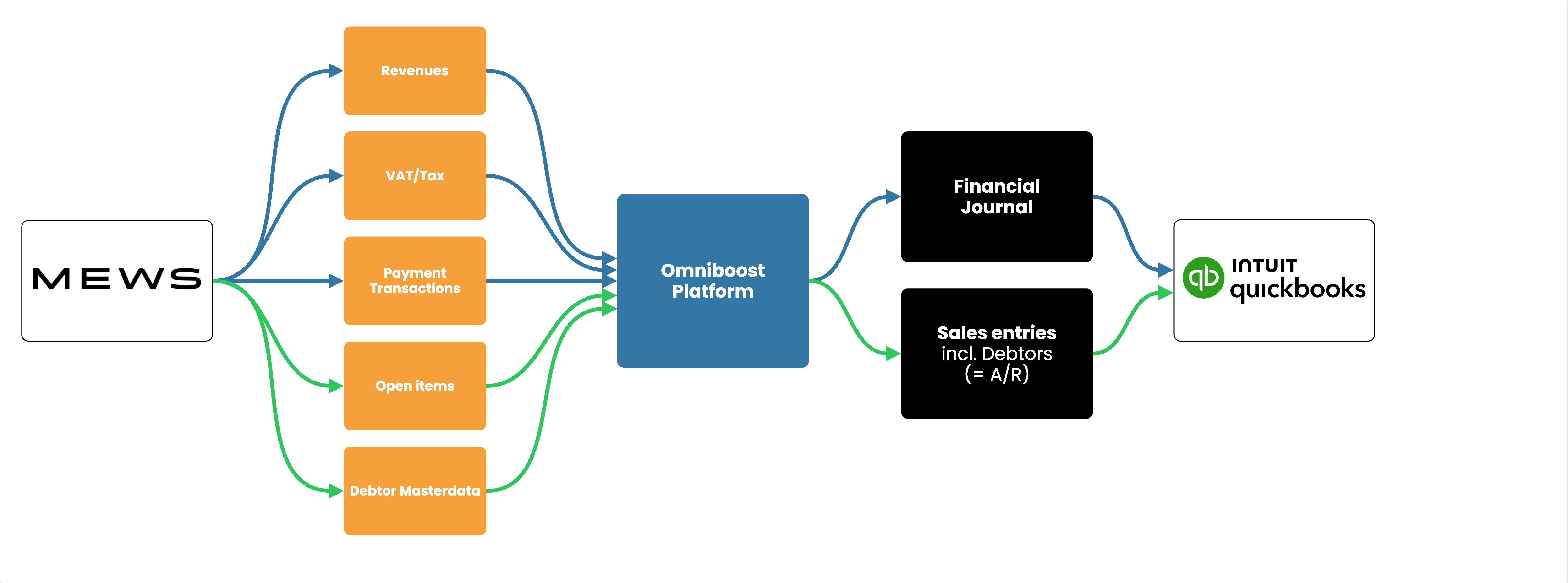
About the Omniboost Base Platform
Omniboost Base gives you a single platform to onboard, monitor, and manage all your Omniboost accounting integrations — across all your properties. From reviewing integration status and updating mapping to tracking data runs and resolving errors, everything you need to keep your connections running smoothly is in one place. Learn more here.
Integration features
Features | Consumed Flow | Closed Flow (Journals) | Closed Flow (Bills & Invoices) |
|---|---|---|---|
Features available for all tiers | |||
Transfer Revenues | Supported | Supported | Supported |
Transfer Payments | Supported | Supported | Supported |
Transfer VAT / Tax | Supported | Supported | Supported |
Accounts Receivables (A/R) | Supported | Supported | Supported |
Features available only in Silver and Gold tiers | |||
Detailed Revenue Entries | Supported | Supported | Supported |
Detailed Payment Entries | Supported | Supported | Supported |
Skipping Revenue Entries | Supported - Only in Bills repo | Supported - Only in Bills repo | Supported - Only in Bills repo |
Skipping Payment Entries | Supported - Only in Bills repo | Supported - Only in Bills repo | Supported - Only in Bills repo |
Credit Card Fee Split - Commission Calculation | Supported | Supported | Supported |
Matching Debtor numbers | Supported | Supported | Supported |
Features available only in Gold tier | |||
Statistics | Not Supported | Not Supported | Not Supported |
Customizing the Journal Description | Supported | Supported | Supported |
Customizing Revenue and Payment descriptions | Supported | Supported | Supported |
Market Segmentation for Accommodation Revenues | Supported | Supported | Supported |
Advanced Mapping Logic | Supported | Supported | Supported |
Payment Reconciliation Support | Supported | Supported | Supported |
Please note: Features and flowchart may vary depending on the setup of the target and source systems, the selected tier, and the accounting flow applied. Not all features in the Omniboost Base Platform are supported for all integrations.

Martijn van der Valk
Hotel General Manager, Van der Valk
Looking for this Solution?
We are happy to help you with your integration, just fill out the form and we will contact you about the possibilities.
