About this integration

Source Specification:
Mews

Target Specification:
DATEV: Both on-premise and cloud

Availability:
Available in the following countries: Germany & Austria

Connectivity:
Mews: We connect with MEWS through its API
Datev: The integration method depends on both your Omniboost tier and your DATEV environment (on-premise or cloud). Bronze includes a file-based integration by default. Silver and Gold support API-based integration compatible with your DATEV version, enabling more automated data exchange.

Data Frequency & Timing:
By default the integration runs daily. The timing of the integration run is flexible but always respects the end-of-day settings in your MEWS environment.

Available Accounting Flows: The difference between a Closed and Consumed accounting flow
Consumed-Accounting Flow (Accrual)
Closed-Accounting Flow (Journal Entries - Cash based)

Pick the tier that matches your operation
The Mews integration is available in three tiers. Each unlocks more granular data, support, and onboarding to fit the needs of your property or group.
Bronze is included in your Mews subscription for standard automation, while Silver and Gold unlock more granular data flows, dedicated Omniboost support, and ongoing optimization for teams with more complex requirements. Learn more here.

Integration Flowchart
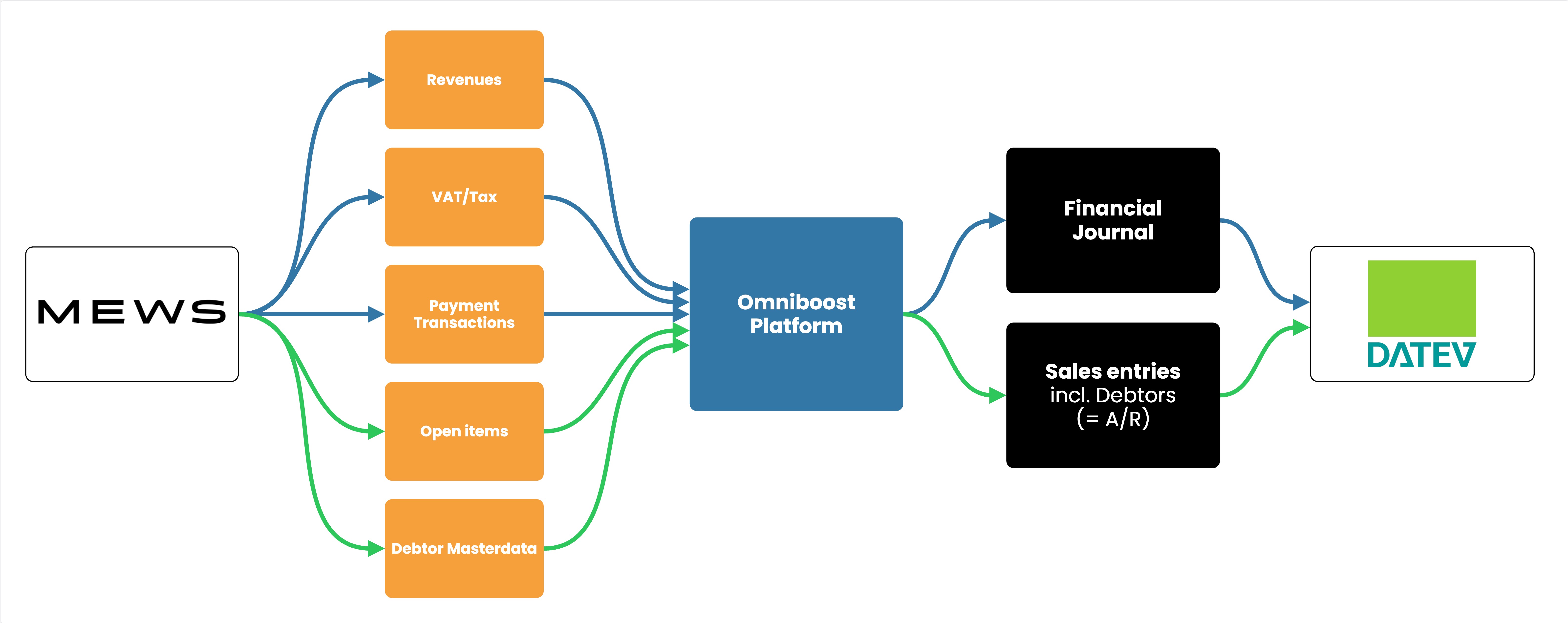
About the Omniboost Base Platform
Omniboost Base gives you a single platform to onboard, monitor, and manage all your Omniboost accounting integrations — across all your properties. From reviewing integration status and updating mapping to tracking data runs and resolving errors, everything you need to keep your connections running smoothly is in one place. Learn more here.

Integration features

Features

Consumed Flow

Closed Flow (Journals)

Features available for all tiers

Transfer Revenues
Transfers revenues to the accounting platform aggregated by MEWS Accounting Category for simplified reporting.

Supported

Supported

Transfer Payments
Transfers payments to the accounting platform aggregated by MEWS Accounting Category for simplified tracking.

Supported

Supported

Transfer VAT / Tax
Transfers VAT/Tax to the accounting platform using either designated ledger account codes or VAT/Tax codes, based on your configuration.

Supported -
this is handled in DATEV

Supported -
this is handled in DATEV

Accounts Receivables (A/R)
Transfers revenues from checked-out guests with unpaid balances to the accounting platform, linked to their debtor profiles for accurate A/R management.

Supported

Supported

Features available only in Silver and Gold tiers

Detailed Revenue Entries
Provides more granular, line-level revenue transaction details instead of aggregated totals, enabling deeper financial insight and reporting.

Supported

Supported

Detailed Payment Entries
Provides detailed, line-level payment transaction data instead of aggregated totals, allowing more precise tracking and reconciliation of payments.

Supported

Supported

Skipping Revenue Entries
Allows exclusion of specific revenue transactions (by accounting category) from being transferred to the accounting platform.

Supported

Supported

Skipping Payment Entries
Allows exclusion of specific payment transactions (by accounting category) from being transferred to the accounting platform.

Supported

Supported

Credit Card Fee Split - Commission Calculation
Separates estimated credit card fees from gross payment amounts and posts them to a designated ledger account, enabling clearer tracking of net payments and processing costs.

Supported - Only when currency feature is disabled in MEWS

Supported - Only when currency feature is disabled in MEWS

Matching Debtor numbers
Enables use of existing debtor numbers from your accounting system by reading them directly from the Mews PMS, avoiding duplicate debtor creation.

Supported

Supported

Features available only in Gold tier

Statistics
Enables the transfer of Mews statistical data (e.g., arrivals, departures, occupancy) to your accounting system for enhanced reporting and decision-making.

Not Supported

Not Supported

Customizing the Journal Description
Allows you to customize journal entry descriptions beyond the default PMS reference format for better identification in your accounting platform.

Supported

Supported

Customizing Revenue and Payment descriptions
Allows customization of journal entry line descriptions beyond the default PMS Accounting Category names.

Supported

Supported

Market Segmentation for Accommodation Revenues
Breaks down accommodation revenues by market segment, enabling more granular reporting and ADR calculations per segment.

Supported

Supported

Advanced Mapping Logic
Supports detailed mapping of ledger accounts, cost centers, and other journal entry elements when standard Mews PMS mapping capabilities are insufficient.

Supported

Supported

Payment Reconciliation Support
Helps streamline reconciliation of Mews payment entries with bank account transactions by including additional payment details where needed.

Supported

Supported

Please note: Features and flowchart may vary depending on the setup of the target and source systems, the selected tier, and the accounting flow applied. Not all features in the Omniboost Base Platform are supported for all integrations.


Additional Silver tier features for DATEV customers only

  • Why start with Silver?

    Silver includes everything in Bronze, plus the DATEV-specific features and the hands-on support that most German and Austrian properties need:

    • All Bronze features
    • API-based DATEV integration
    • Credit Card Fee Split
    • Cash Payment Journal
    • Invoice PDF Transfer
    • Detailed Revenues and Payments
    • Skipping Accounting Categories
    • Bi-weekly expert calls via Teams before, during, and after onboarding
    • Priority support · 3 bd response
    • 14 days of validated test data
    • Reruns up to 90 days

    More than 250 hotels have already upgraded to Silver or Gold for the Mews to DATEV integration. Hotel Esplanade Cologne uses our Mews to DATEV integration and describes it as a real game changer. You can read Managing Director Michael Piontek's experience on our website: https://omniboost.com/resources#testimonials

    You can downgrade to the Bronze tier at any time.

  • API-based DATEV integration

    Bronze delivers a file-based integration. Silver connects to DATEV over its API, on-premise or cloud, matched to your DATEV environment. This means less manual work, better support, maintain cleaner books, more up to date financial numbers, and achieve faster month end closing for your team.

  • Credit Card Fee Split

    Card payments usually arrive net of the processor's fee, which makes reconciliation against gross revenue awkward. Silver separates the estimated card fee from the gross payment and posts it to a dedicated ledger account. Your net takings and your processing costs are booked clearly and separately from day one, so bank reconciliation lines up without manual correction (available when the currency feature is disabled in Mews).

  • Cash Payment Journal

    In markets such as Germany and Austria, cash is still everyday business, and every movement has to be accounted for. The Cash Payment Journal reads the cash movements from your Mews Payment Report and posts them into DATEV as journal entries, either inside your daily accounting file or as a separate KAS file. This closes the gap our German customers see most often: cash that appears in the Payment Report but is missing from the standard accounting output. Cash added to and withdrawn from the drawer map to separate ledger accounts, so your team keeps full visibility of what goes in and out. Available exclusively for DATEV.

  • Invoice PDF Transfer

    Invoice PDFs can be sent automatically to the email addresses you choose, most commonly your finance team's inbox, for seamless internal processing. Your accounting team receives all source documents directly by email, supporting audit trails and compliance requirements, and giving easier access to invoices without logging in to the PMS.

  • Bronze self-onboarding vs Silver guided onboarding

    With Bronze you complete the onboarding steps yourself in Base, at your own pace, with the kick-off call near the end before go-live. With Silver you get bi-weekly expert calls via Teams before, during, and after onboarding: we set up the integration together with you and, where relevant, your Steuerberater, align the export format before go-live, and validate it with test data first.

    Most customers find the priority support and expert guidance most valuable during onboarding and the first months after go-live, which is exactly when you need it. With Silver, our team guides you through the accounting setup so it's configured correctly from the start. A pre-onboarding call covers your accounting flow and related choices, such as enabling or disabling Receivable Tracking (default: disable, so debtor follow-up happens in DATEV), plus mapping guidance for your GL accounts and cost centers. You remain responsible for your own chart of accounts. Silver does not cover changes to your chart of accounts, full PMS or POS configuration, or automatically scheduled recurring calls.

Working with Omniboost has been a real game changer for us at Hotel Esplanade Cologne. Their professionalism, responsiveness, and deep understanding of hospitality and accounting made the complex PMS–accounting integration smooth and clear. With their reliable support and commitment, we’ve gained both confidence and efficiency in our daily work.

Michael Piontek
Managing Director, Hotel Esplanade Cologne

Onboarding Process

Before You Start: Before starting your onboarding, your Mews setup must be completed, following the steps described in this Mews configuration guide. The integration cannot be configured or activated until this step is finished.

  1. Request the integration
    After completing your Mews setup, request the integration via the Mews marketplace within your Mews PMS environment. You will receive an invitation within minutes to Base, the Omniboost integration platform. 
  2. Select your tier
    Select from three integration tiers based on your requirements
  3. Complete onboarding
    Please complete the guided steps in “Base” and submit all required information promptly, as any delays directly affect the amount of historical data that can be included. Learn more about the onboarding in The Omniboost Base Platform. 
  4. Review and go-live
    Omniboost reviews your configuration, performs validation, and activates the integration. Data will not flow until the integration is set live by Omniboost.

Looking for this Solution?

We are happy to help you with your integration, just fill out the form and we will contact you about the possibilities.

Request this integration