

With Omniboost's automated integration we no longer have to manually send all our transaction data to our accountant on a daily basis, saving us valuable time and money while eliminating stress.

-
Products

- Industries
- Integrations
-
Resources

-
Company

-
Contact us
- Login
-
ProductsView all products
 Accounting
 PMS
PMS POS
POS Insights
 Owners Portal
-
IndustriesView all industries
Management Companies
 Hospitality Groups & Chains
Boutiques & Smaller Groups
Hospitality Groups & Chains
Boutiques & Smaller Groups Restaurants & Cafes
 Vendors
-
IntegrationsView all integrations

-
ResourcesNews
 Podcast
 Case Studies
 Testimonials
 Glossary
 Media Kit
-
CompanyAbout Us
 Careers
 Help Center
 Integrations
Trust Center
Integrations
Trust Center Login
Login
Lightspeed K-Series to QuickBooks Online
Back to Lightspeed K-Series


The Lightspeed K-Series to QuickBooks integration automates the transfer of financial data from Lightspeed K-Series POS into QuickBooks accounting. The integration eliminates manual data entry, improves accuracy, and speeds up month-end closing for your hotel finance team.
About this integration
Source Specification:
Lightspeed K-Series
Target Specification:
QuickBooks Online
Connectivity:
Lightspeed K-Series: Connects securely to your Lightspeed point-of-sale system to automatically retrieve data.
QuickBooks Online: Uses the QuickBooks Online API to securely and automatically post data.
Data Frequency & Timing:
By default, the integration runs daily. The integration run time is flexible but always respects the end-of-day settings in your Lightspeed POS environment.
Available Accounting Flows: The difference between a Closed and Consumed accounting flow
Closed-Accounting Flow (Journal Entries - Cash based)
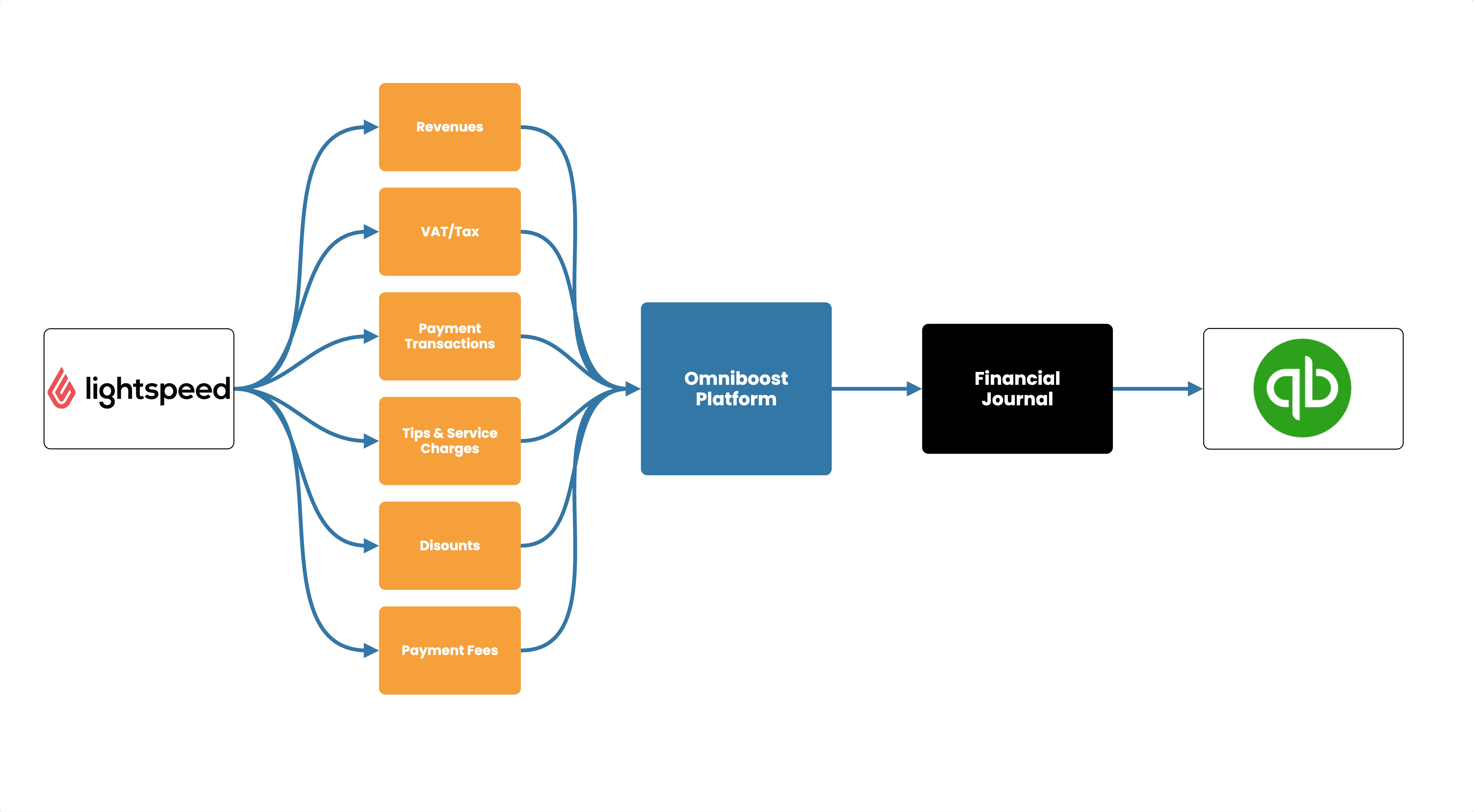
Integration Flowchart
About the Omniboost Base Platform
Omniboost Base gives you a single platform to onboard, monitor, and manage all your Omniboost accounting integrations — across all your properties. From reviewing integration status and updating mapping to tracking data runs and resolving errors, everything you need to keep your connections running smoothly is in one place. Learn more here.
Integration features
Features | Supported |
|---|---|
Manual Journal Entry | Supported |
Sales Entries | Supported |
VAT/TAX Breakdown | Supported |
Revenue Mapping | Supported |
Payment Mapping | Supported |
Cost Centers | Supported |
Discount | Supported |
Refunds | Supported |
Tip | Supported |
Service Charges | Supported |
Rounding Account | Supported |
Surcharges | Supported |
Journal Description | Supported |
Please note: Features and flowchart may vary depending on the setup of the target and source systems, and the accounting flow applied. Not all features in the Omniboost Base Platform are supported for all integrations.

Julian Staar
Owner, Hotel Restaurant Les Eleveurs
Looking for this Solution?
We are happy to help you with your integration, just fill out the form and we will contact you about the possibilities.
