






























About this integration
Source Specification:
Apaleo
Target Specification:
Exact Online
Connectivity:
Source and target systems connect and exchange data automatically via API.
Data Frequency & Timing:
By default, the integration runs daily. The timing of the integration run is flexible but always respects the end-of-day settings in your Apaleo environment.
Available Accounting Flows: The difference between a Closed and Consumed accounting flow
Consumed-Accounting Flow (Accrual)
Closed-Accounting Flow (Journal Entries - Cash-based)
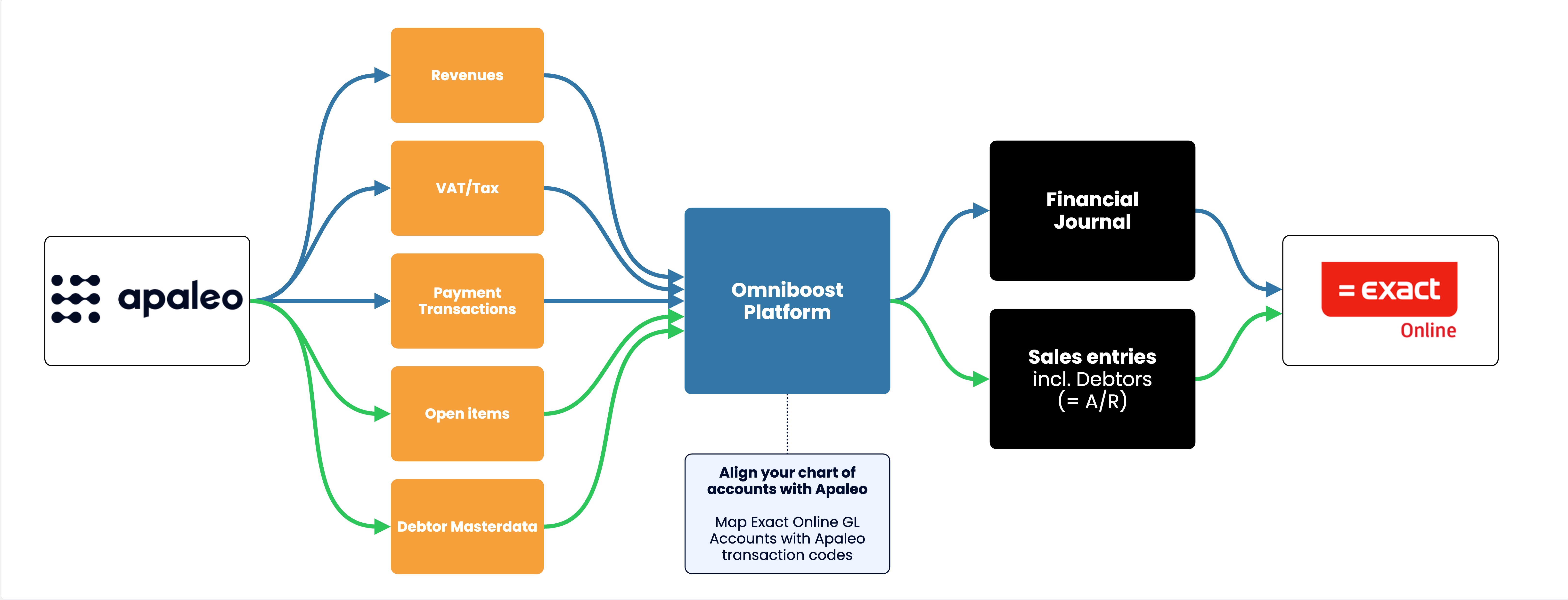
Integration Flowchart

About the Omniboost Base Platform
Omniboost Base gives you a single platform to onboard, monitor, and manage all your Omniboost accounting integrations — across all your properties. From reviewing integration status and updating mapping to tracking data runs and resolving errors, everything you need to keep your connections running smoothly is in one place. Learn more here.
Integration features
Features | Consumed Flow | Closed Flow (Journals) |
|---|
Features available for all tiers |
Transfer Revenues Transfers revenues to the accounting platform aggregated by Accounting Category for simplified reporting. | Supported | Supported |
Transfer Payments Transfers payments to the accounting platform aggregated by Accounting Category for simplified tracking. | Supported | Supported |
Transfer VAT / Tax Transfers VAT/Tax to the accounting platform using either designated ledger account codes or VAT/Tax codes, based on your configuration. | Supported | Supported |
Accounts Receivables (A/R) Transfers revenues from checked-out guests with unpaid balances to the accounting platform, linked to their debtor profiles for accurate A/R management. | Supported | Supported |
Features available only in Silver and Gold tiers |
Detailed Revenue Entries Provides more granular, line-level revenue transaction details instead of aggregated totals, enabling deeper financial insight and reporting. | Supported | Supported |
Detailed Payment Entries Provides detailed, line-level payment transaction data instead of aggregated totals, allowing more precise tracking and reconciliation of payments. | Supported | Supported |
Skipping Revenue Entries Allows exclusion of specific revenue transactions (by accounting category) from being transferred to the accounting platform. | Supported | Supported |
Skipping Payment Entries Allows exclusion of specific payment transactions (by accounting category) from being transferred to the accounting platform. | Supported | Supported |
Credit Card Fee Split - Commission Calculation Separates estimated credit card fees from gross payment amounts and posts them to a designated ledger account, enabling clearer tracking of net payments and processing costs. | Supported | Supported |
Matching Debtor numbers Enables use of existing debtor numbers from your accounting system by reading them directly from the PMS, avoiding duplicate debtor creation. | Supported | Supported |
Features available only in Gold tier |
Statistics Enables the transfer of statistical data (e.g., arrivals, departures, occupancy) to your accounting system for enhanced reporting and decision-making. | Not Supported | Not Supported |
Customizing the Journal Description Allows you to customize journal entry descriptions beyond the default PMS reference format for better identification in your accounting platform. | Supported | Supported |
Customizing Revenue and Payment descriptions Allows customization of journal entry line descriptions beyond the default PMS Accounting Category names. | Supported | Supported |
Market Segmentation for Accommodation Revenues Breaks down accommodation revenues by market segment, enabling more granular reporting and ADR calculations per segment. | Supported | Supported |
Advanced Mapping Logic Supports detailed mapping of ledger accounts, cost centers, and other journal entry elements when standard PMS mapping capabilities are insufficient. | Supported | Supported |
Payment Reconciliation Support Helps streamline reconciliation of payment entries with bank account transactions by including additional payment details where needed. | Supported | Supported |
Please note: Features and flowchart may vary depending on the setup of the target and source systems, the selected tier, and the accounting flow applied. Not all features in the Omniboost Base Platform are supported for all integrations.
