

Teaming up with Omniboost was an easy decision because of the vision and energy they brought to the table, coupled with their deep technical expertise. Embarking on this project together is a great fit. We’re looking forward to this project and many more to follow.

-
Products

- Industries
- Integrations
-
Resources

-
Company

-
Contact us
- Login
-
ProductsView all products
 Accounting
 PMS
PMS POS
POS Insights
 Owners Portal
-
IndustriesView all industries
Management Companies
 Hospitality Groups & Chains
Boutiques & Smaller Groups
Hospitality Groups & Chains
Boutiques & Smaller Groups Restaurants & Cafes
 Vendors
-
IntegrationsView all integrations

-
ResourcesNews
 Podcast
 Case Studies
 Testimonials
 Glossary
 Media Kit
-
CompanyAbout Us
 Careers
 Help Center
 Integrations
Trust Center
Integrations
Trust Center Login
Login
Opera Cloud to Oracle NetSuite
Back to Oracle NetSuite


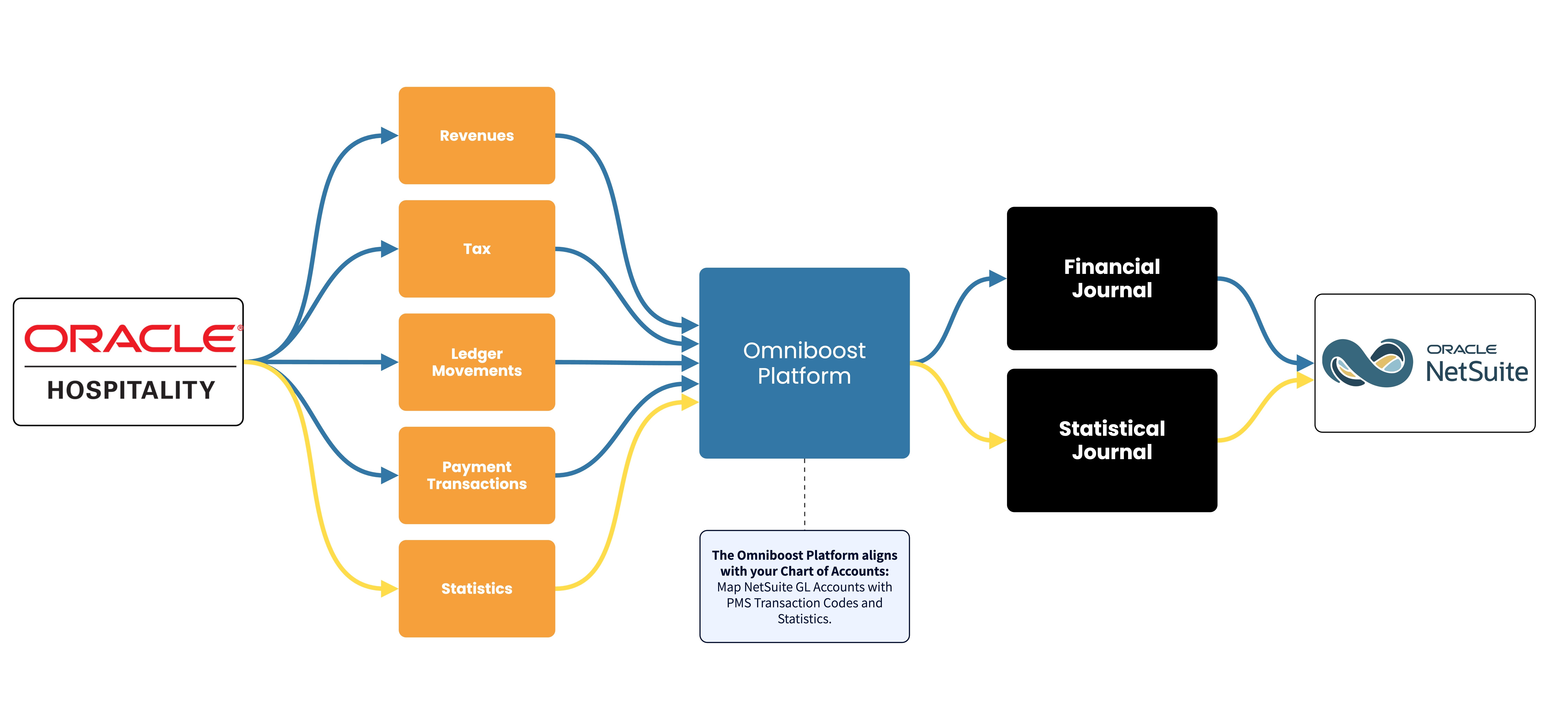
The Opera Cloud to NetSuite integration by Omniboost transfers accounting and statistical data from your Opera Cloud environment to NetSuite. The integration eliminates manual data entry, improves accuracy, and speeds up month-end closing for your hotel finance team.
About this integration
Source Specification:
Opera Cloud
Target Specification:
Oracle NetSuite
Connectivity:
Opera Cloud: We connect with Opera Cloud through enabling a daily export of PMS Reports. Connecting via the Reporting and Analytics (R&A) API is scheduled for 2026.
Oracle NetSuite: The system connects and exchanges data automatically via NetSuite’s API.
What is posted in NetSuite:
Financial Journal: The integration posts a daily Financial journal in NetSuite. This journal contains your hotel’s:
Revenues
Tax
Payment transactions
Ledger movements (Guest Ledger, Deposit Ledger, A/R Ledger)
Statistical Journal: The integration posts a daily Statistical journal in NetSuite. This journal contains your hotel’s:
Room statistics, including Rooms Occupied, Number of Rooms, Rooms OOO, etc.
Guest statistics: including Number of Guests, Arrivals, Departures, etc.
Data Frequency & Timing:
By default, the integration runs daily. The timing of the integration run is flexible but always respects the end-of-day settings in your Opera Cloud environment.
Integration Flowchart
About the Omniboost Base Platform
Omniboost Base gives you a single platform to onboard, monitor, and manage all your Omniboost accounting integrations across all your properties. From reviewing integration status and updating mapping to tracking data runs and resolving errors, everything you need to keep your connections running smoothly is in one place. Learn more here.
Pricing
Every hospitality business has different integration requirements, which is why Omniboost offers flexible pricing tiers for connecting your PMS with NetSuite. Whether you’re looking for straightforward financial automation or require deeper data flows, hands-on onboarding, and priority support, there’s a tier to match your needs.
Explore our pricing options below to compare features, support levels, and onboarding services, and find the integration package that best fits your operation.

Kyle McCaig
Director of Technology, MCR
Onboarding Process
Before You Start: Complete your Opera Cloud setup before starting your onboarding. The integration cannot be configured or activated until this step is finished.
- Request the integration
Request the integration via the button at the bottom of the page. Our team will reach out to discuss your requirements and determine the most suitable tier. Based on this, we’ll provide the relevant integration agreement for your review and approval. - Complete onboarding
You will receive an invitation to BASE, the Omniboost integration platform. Please complete the guided onboarding steps and submit all required information. One of the key steps in BASE is mapping your GL Accounts to ensure your financial data is correctly reflected in NetSuite. Once you have completed BASE, the Omniboost team will have everything needed to configure your NetSuite integration. - Test the integration
The Omniboost team will send test journals to NetSuite to verify that the integration is configured correctly. Please review the test journals and confirm that the data, mappings, and accounting entries are correct. - Review and go live
Once testing is successfully completed, Omniboost will perform a final review and activate the integration. Financial and statistical journals will start being sent to NetSuite daily once Omniboost goes live.
Timeline: Please allow approximately 4–5 business weeks for the complete onboarding, configuration, testing, and go-live process. The exact timeline may vary depending on the complexity of the setup and how quickly the required onboarding steps and test journals are reviewed.
Looking for this Solution?
We are happy to help you with your integration, just fill out the form and we will contact you about the possibilities.
