





























About this integration

Source Specification:
Apaleo

Target Specification:
Exact Online

Connectivity:
Source and target systems connect and exchange data automatically via API.

Data Frequency & Timing:
By default, the integration runs daily. The timing of the integration run is flexible but always respects the end-of-day settings in your Apaleo environment.

What is posted in Exact Online:

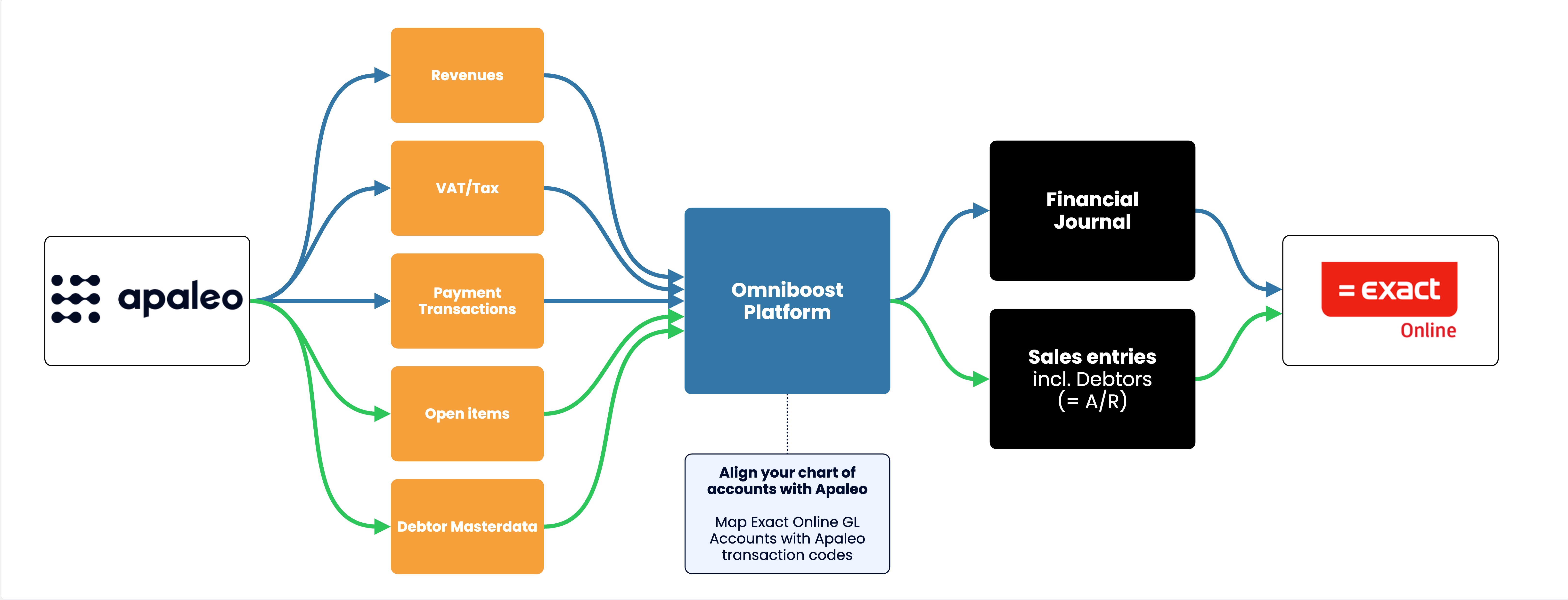
  • Financial Journal: The integration posts a daily Financial Journal in Exact Online. This journal contains your hotel’s:

    • Revenues

    • VAT

    • Payment transactions

    • Ledger movements (Guest Ledger, Deposit Ledger, A/R Ledger)

Integration Flowchart

About the Omniboost Base Platform
Omniboost Base gives you a single platform to onboard, monitor, and manage all your Omniboost accounting integrations across all your properties. From reviewing integration status and updating mapping to tracking data runs and resolving errors, everything you need to keep your connections running smoothly is in one place. Learn more here.

Onboarding Process

Before You Start: Before you start onboarding, you must complete your Apaleo setup. You can't configure or activate the integration until you complete this step. In Apaleo, please ensure your environment has all revenue- and payment-related settings/categories configured.  In your accounting system, please ensure that your chart of accounts, cost centers, and tax rates are configured.  

  1. Request the integration
    After completing your Apaleo setup, please go to the Apaleo Store and search for the required integration. Click the integration, then click the Connect App button in the top-right corner. You will be redirected to the Omniboost onboarding platform, Base.
  2. Confirm your subscription
    The Omniboost team will reach out with a subscription agreement for your review and approval.
  3. Complete onboarding
    Please complete the guided steps in “Base” and submit all required information promptly, as delays directly affect how much historical data we can include.
  4. Review and go-live
    Omniboost reviews your configuration, performs validation, and activates the integration. Data will not flow until Omniboost sets the integration live.

Looking for this Solution?

We are happy to help you with your integration, just fill out the form and we will contact you about the possibilities.

Request this integration